Desktop reference
The mechanics behind Codex app, Claude Desktop, and Claude Desktop on managed devices.
Where each piece lives
macOS paths. Windows keeps the route in HKCU\SOFTWARE\Policies\Claude instead of the profile
entry.
| Piece | Where Connect writes it | How to check |
|---|---|---|
| Model route | The profile entry named Anyray in ~/Library/Application Support/Claude-3p/configLibrary/: inferenceProvider = gateway, inferenceGatewayBaseUrl, and inferenceCredentialHelper | anyray-connect doctor reads "pointed at" your gateway |
| Credential | ~/.anyray/bin/claude-desktop-credential-helper, which resolves the key or seat token when Claude Desktop asks. No key is stored in Claude's configuration | main.log logs [custom-3p] helper ok |
| Retrieval tools | mcpServers.anyray in Claude-3p/claude_desktop_config.json, a local command | doctor reads "retrieval MCP server registered"; Settings → Developer lists it |
| Org connectors | The anyray-connectors element of the entry's managedMcpServers, with its header script ~/.anyray/bin/claude-desktop-org-mcp-headers | main.log logs [custom3p-mcp] connected { name: 'anyray-connectors', … } |
| Skills | The anyray-org-skills element of the entry's allowedPluginMarketplaces, served at <gateway>/connect/claude-desktop/plugins/marketplace.json | main.log logs [custom-3p:configured-marketplaces]. doctor reports only the Claude Code copies |
| Hooks | None for Claude Desktop. The Code tab runs the bundled Claude Code, which reads the hooks in ~/.claude/settings.json | doctor's Claude Code rows |
| Console policy | The console's Claude Desktop policy, copied into the entry on each policy sync: the model list, restrictions, egress and surfaces, plus the built-in GitHub and Microsoft 365 rows and your own plugin marketplaces as elements | main.log logs picker = N (inferenceModels); a value Claude cannot read logs Failed to parse managed config "<key>" and only that key is dropped |
| Web search | The anyray-web-search element of managedMcpServers (provider = custom), present while the console's Web search connector is set up and the gateway is https. The gateway runs each search with the org's key; the row uses the org-connector header script | main.log logs [builtin-websearch] connected |
Claude Desktop's own log is ~/Library/Logs/Claude-3p/main.log.
What the policy sync copies
Connect copies a value only while the entry has none or still holds the one Connect wrote, so a setting the person changed in Configure Third-Party Inference stays theirs. When your admin removes a value, Connect removes its own copy, and disconnecting removes all of them.
| Not copied | Why |
|---|---|
isLocalDevMcpEnabled, disableDeploymentModeChooser | They would block Connect's local retrieval server and the switch back to claude.ai |
disableAutoUpdates and the other update controls | An MDM delivers updates on managed devices; nothing would on this machine |
Every otlp* key, sharingEndpoint, userContentRendererUrl, selfHostedUrl | Each names a destination for this machine's data that your Anyray content mode does not govern, and otlpAuthMode: inference-credential would send the seat's key to it |
forceLoginOrgUUID and the other claude.ai account controls | The person's own account is what Undo returns them to |
The route, the credential helper, bootstrap*, egress proxies, EDR | Connect owns the route; the rest are device-only or name a path only an MDM installs |
Built-in GitHub and Microsoft 365 rows are rebuilt from their own fields, so a row cannot also
carry a command, a header script or a URL. chatTabEnabled, autoModeEnabled, toolSearchEnabled
and coworkEgressAllowedHosts are values Connect sets itself. Your admin's value replaces Connect's, and a later repair keeps it.
On Windows the same values land beside Connect's own under HKCU\SOFTWARE\Policies\Claude, as
REG_SZ (JSON for lists and objects). The built-in connectors share one managedMcpServers value,
and its Web search row uses ~\.anyray\bin\claude-desktop-headers-helper.cmd, which prints the
seat's key at call time and stores none. A value of another type, or one Connect did not write, is
left alone, and a machine-wide HKLM policy turns the copy off because Claude then ignores HKCU.
Billing lanes
The lane follows the platform and the enrolled auth mode. You never pick it in the app.
| Lane | When | How it authenticates |
|---|---|---|
| subscription | Claude subscription enrollment on a verified macOS build, or on Windows | At setup, Connect mints a seat token through Claude Code's own claude setup-token flow (one browser approval) and stores it 0600 beside your Connect profile. On macOS without a separate Claude Code install, Connect uses the copy Desktop keeps for its Code tab. A local credential helper reads that token on demand and adds Anyray's pass-through headers. Nothing reads the macOS Keychain, no credential is written into Desktop's config, and Desktop's own first-party login stays direct. The token is valid for a year; Connect asks you to renew it. |
| API-billed | Org or API enrollment, on either platform | The helper resolves your personal gateway key (ark_…) at request time. No static key is stored in Claude's configuration. |
If the seat token cannot be read, Connect fails closed: a subscription request never moves to API billing on its own.
How Connect configures each platform
| Platform | Mechanism |
|---|---|
| macOS | Automatic when Connect can verify the installed build's config seam: the app is 1.21459.0 or newer and its bundle still ships the configuration shape Connect writes. Before writing, Connect checks Claude is closed and no managed policy owns the setting. The subscription lane mints its seat token with claude setup-token, from a Claude Code install or the copy inside Claude Desktop, and Connect runs the credential helper once end to end before reporting success. |
| Windows | Writes the per-user policy HKCU\SOFTWARE\Policies\Claude and a key-free credential helper, with no admin rights. An existing machine-level HKLM policy is left untouched. The subscription lane works the same way as on macOS: Connect mints the seat token with claude setup-token, so Claude Code must be installed, and the helper is run once end to end before Connect reports success. |
On supported automatic lanes Connect configures both the inference route and the retrieval MCP server. Known conflicts are rejected before routing changes, and an interrupted write recovers by re-running the command. Key renewal never rewrites Claude policy, because the helper resolves the current key at request time. After a Desktop app update, Connect rechecks the macOS seam before any local healing and fails closed if the new build is not verifiable.
Model list and the default model
When inferenceModels is unset, Claude Desktop builds the picker from the gateway's
GET /v1/models response and selects its own default, which can be a more expensive model than
your developers were using. The first inferenceModels entry is the default, so set the list
explicitly:
[{ "name": "claude-sonnet-5-5" }, { "name": "claude-opus-5-5", "supports1m": true }]
Use full model ids the gateway accepts, because bare tier aliases such as sonnet rely on discovery
to resolve. Set modelDiscoveryEnabled to false to skip the discovery request and its launch delay
when the gateway is only reachable on an internal network.
Discovery follows the same route inference does: the default routing config, or the sole provider key
when exactly one is configured, falling back to Anthropic only when neither is set. The fallback
still needs an Anthropic credential, meaning a key on the console's Providers page or the seat's own
Claude subscription passed through. With neither a route nor a credential, discovery answers 424,
so a picker that errors means the deployment has no usable route yet.
When the route reaches Amazon Bedrock, which has no model list to forward to, the gateway answers itself: the models your admin named in aliases or the default routing config, plus every current Claude model Bedrock serves, newest first, unless an admin already named one on Bedrock. Claude Fable is left out, because Bedrock does not serve it by default. A route through a custom host still forwards.
A seat on the subscription lane is answered by the gateway itself rather than forwarded, because a
Claude subscription token is not a credential Anthropic's /v1/models accepts. That answer is the
models your admin named in aliases or the default routing config. When an admin named none, which is
the normal state of a deployment whose developers all bring their own subscription, the gateway
publishes every Claude model it prices, newest first, so a developer can pick Opus for one task and
Haiku for the next. Naming even one model takes the list back: the gateway then publishes exactly
what you configured, which is how you narrow the picker for everyone.
Surfaces third-party mode turns off
Third-party mode defaults several app features off. Setup turns them back on, so connecting changes
where requests go and nothing else. Which lane sets which key differs, because an MDM artifact
grants machine-wide while anyray-connect configures one seat:
| Key | Set by | Why |
|---|---|---|
chatTabEnabled | connect, static artifacts, bootstrap | Third-party mode hides the Chat tab by default (Claude Desktop 1.13576.0 and newer). |
toolSearchEnabled | connect, static artifacts, bootstrap | Third-party mode loads every MCP tool schema into context up front instead of on demand (1.21459.0 and newer). With many connectors configured, the schemas alone can fill most of the window and force frequent compaction. |
isLocalDevMcpEnabled = true | bootstrap | Lets Desktop start Connect's local sharing connector. The bootstrap value replaces your MDM profile's, so a false there no longer applies. To keep local connectors off, set false in the console policy, which wins; doctor then reports the publishing connector as blocked_by_policy. |
autoModeEnabled | connect only | Third-party mode hides Auto mode in the Code and Home permission selectors and disables it in the bundled Claude Code (1.10628.0 and newer). A seat that runs anyray-connect gets back the mode it had before connecting; whether every managed device has it is your decision, so set it yourself in the console policy. |
coworkEgressAllowedHosts = * | connect, static artifacts | Third-party mode otherwise narrows the Home and Code sandbox network to the gateway alone (1.2581.0 and newer). * restores what first-party mode allowed. Bootstrap leaves it to you for the same reason as Auto mode. |
To turn any of them back off, set your own value: a managed profile outranks local setup, and the console policy outranks the defaults above. Anthropic's docs list required egress hosts under Egress Requirements.
Claude.ai organization management
Third-party inference (inferenceProvider) and claude.ai organization management are mutually
exclusive:
| What changes | |
|---|---|
| The claude.ai admin console stops delivering | Managed connectors and MCP servers, plugins, skills, model policy, workspace policy |
| Unaffected | Claude Code. It routes to the gateway, and its claude.ai login stays saved |
| Your admin surface becomes | The managed configuration profile (Managed devices) |
Everything returns in first-party mode. Org settings and connector grants do not export, and some connectors break (below). To keep org management, keep Claude Desktop first-party.
Connectors under third-party inference
Connectors not labeled "Made by Anthropic" work under third-party inference. managedMcpServers
carries remote HTTP and SSE servers, local stdio commands, and the built-in microsoft365,
websearch, and github connectors.
Claude Desktop drops a built-in connector that is missing a required field, so the policy leaves one out until it is set up. The console marks each one that still needs setup.
| Built-in | What it needs |
|---|---|
| GitHub | Your organization's GitHub OAuth app client ID. For GitHub Enterprise Server, also its address |
| Microsoft 365 | Your Entra tenant ID and the Entra app's client ID |
| Web search | A search API key from Brave, Tavily or Exa, set on the Web search connector in the console |
The Web search key stays in the gateway. The policy points Claude Desktop at the gateway's
/connect/claude-desktop/websearch, which runs each search with that key for a seat with a live
client key. Queries and results are not logged or stored. Setting the key needs a private
ANYRAY_ADMIN_TOKEN, because the gateway encrypts the key with it.
Your organization's connectors arrive here. Connect adds one entry named
anyray-connectors to the Anyray profile, alongside anything you added yourself, and it appears the
next time the app starts. The entry reads its credential from a small script in ~/.anyray/bin
rather than storing a key, so it keeps working as the seat's key rotates. Connectors you add stay
yours: Connect only ever writes and removes that one entry.
The retrieval server is separate and stays in claude_desktop_config.json, which takes local
commands only. That is why the connector entry lives in the profile instead.
Disconnecting the tool removes the entry and its credential script together. An entry you re-pointed at a different address is treated as yours and is left alone.
"Made by Anthropic" connectors exist only in standard Claude Desktop. Google Workspace can be rebuilt through Google's own Workspace MCP servers, but claude.ai connector grants and OAuth identities never transfer.
Optimization boundary
Gateway-routed requests get the optimizer strategies on every lane, so a subscription seat is
optimized the same as an API-billed one. The exception is a Codex ChatGPT seat, which the gateway
relays unchanged (Codex app). The
registered anyray_retrieve and anyray_recall tools let the optimizer externalize large or duplicated context to a recoverable handle. Without the MCP,
the optimizer still runs and saves tokens but trims context in place, so there is nothing to
retrieve. When tool search hides the tool, Desktop has to have proved it on its own requests
(proving retrieval).
On the manual, unverified, and managed-policy lanes the registration is not authoritative yet, so
status and doctor report retrieval coverage as partial. Chat and Home have no hook that trims
tool results at the source, so retrieval through the MCP is the equivalent there. The Code tab runs
the bundled Claude Code, which runs the same hooks as the Claude Code CLI.
In-app setup
If automatic setup cannot run, configure the app by hand. This paste flow is the API-billed lane, and a selected subscription never falls back to it silently.
macOS: Help → Troubleshooting → Enable Developer Mode in the menu bar. Windows: the menu at the top-left of the sign-in screen.
Developer menu → Configure Third-Party Inference → Gateway. Not Settings → Developer, which is MCP servers rather than inference.
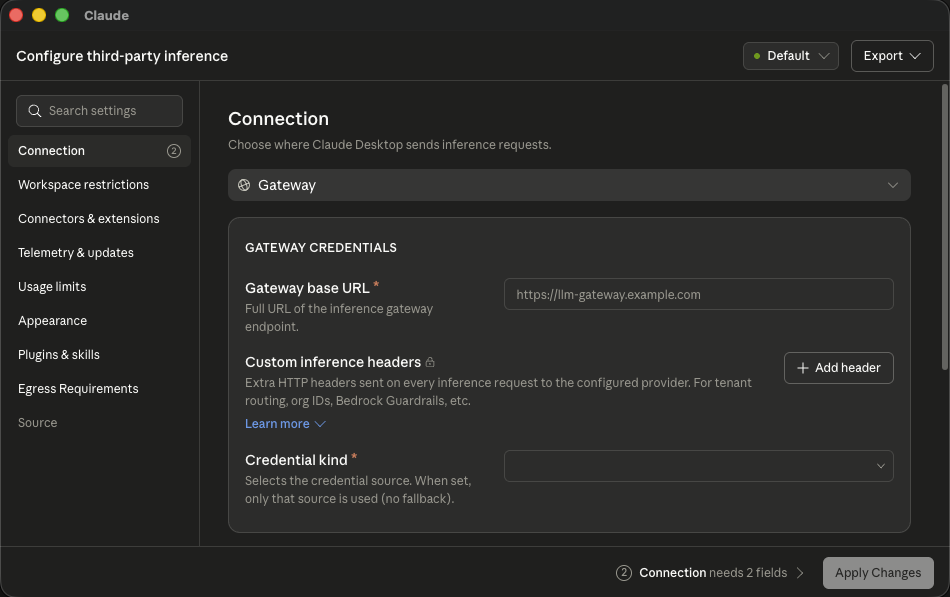
Provider Gateway, base URL https://gateway.example.com, scheme Bearer, and your ark_…
key. Click Apply locally, then fully quit and reopen Claude.
On supported automatic setup, Connect also registers the anyray MCP server in
claude_desktop_config.json: anyray_retrieve, anyray_recall, anyray_search, anyray_read,
anyray_read_batch while your organization has batch reads on, anyray_history once you have
imported conversations, anyray_share while your admin has Artifacts on, and anyray_list_shared
and anyray_open_shared once your gateway can read shared pages. It loads at the same relaunch and
appears under Settings → Developer. An MDM-managed Desktop gets no local anyray server: the
managed one your gateway serves carries retrieval and the two
shared-page tools instead.
anyray-connect doctor --verify confirms requests reach the gateway. Lost the key?
anyray-connect print-key reprints it.
What is already on this machine, automatically
Copying needs the app fully quit, and the destination stores exist only after the new profile has
been opened and signed in to. So Connect queues the copy and completes it at the first safe
opportunity. anyray-connect doctor lists the queued migration until it finishes.
anyray-connect reports how many local items are waiting and queues the copy.To do it now instead, fully quit Claude Desktop and run anyray-connect migrate. It is safe to
re-run, because every step skips what is already there. Run it before a third-party store exists and
it says which store is missing. Signing in to the third-party profile is what creates the store the
copy writes into.
| Local data | What copies |
|---|---|
| Sessions | Claude Code session records whose transcript still exists, plus complete Home task data |
| Local MCP | Non-Anyray entries from claude_desktop_config.json |
| Plugins | Complete user-scope plugin packages with a valid plugin manifest |
| Skills | Skills whose manifest explicitly marks them as user-created and not sync-managed |
The migration is selective, and it copies, never moves. The previous profile stays as it was, an existing item in the target is never overwritten, and the copy runs directly between the two profile directories for the same OS user, reporting counts only.
What never copies
Anthropic-managed bundles, cloud-managed connectors, plugins, or skills, Desktop Extensions,
app preferences, Claude sign-in and OAuth state, connector grants, browser storage, and caches. Malformed or incomplete packages, packages
containing symlinks, and Claude Code sessions whose transcript is no longer on disk are skipped.
Connect reports the counts. An extension left in the first-party profile shows in doctor as
carried_except_extensions.
Claude Code transcripts live in ~/.claude/projects/, outside both profiles, and apply and revert
never touch them.
Several accounts, cancelling, and PATH
Signed into more than one account? Setup leaves the sessions where they are. Run
anyray-connect migrate to pick an account (--account <id>) or take everything
(--all-accounts). An --export in the same run restores your chats before you choose.
A full anyray-connect --revert cancels an outstanding copy, and that run takes the machine off
Anyray. anyray-connect desktop disconnect keeps it queued.
If anyray-connect is not on this shell's PATH, which happens when a setup scoped with
--tools never adds the install directory, call the binary directly:
~/.anyray/bin/anyray-connect migrate.
Put them back in the app
This needs the Claude Code CLI installed on the same machine, because Connect converts the export with Claude Code's own importer. Without it, restore refuses. The searchable archive has no such requirement.
Settings → Privacy → Export data. Anthropic emails a download link that expires after 24
hours. Keep the .zip, because this step takes the archive itself, not the file inside it. If
the link lists several .zip files, your chats are in conversations-000.zip.
On a Team or Enterprise plan the button is missing until an Owner turns on Allow members to export their own data under Data controls in Organization settings → Data and privacy.
The Primary Owner never gets a personal button. Their only export is the organization's
(Export data in that same Data controls section). It covers every member and arrives as
a manifest-….json listing several .zip downloads (conversations, projects, artifacts), each
link good for 24 hours. migrate restores from a personal export only, so it cannot use this
one.
A running app writes its conversation list back on exit and would undo the restore.
- macOS / Linux
- Windows PowerShell
anyray-connect migrate --export ~/Downloads/conversations-000.zip
anyray-connect migrate --export $HOME\Downloads\conversations-000.zip
No anyray-connect on this shell's PATH? Go through the installer. The subcommand belongs
after sh -s --, not on the curl line.
- macOS / Linux
- Windows PowerShell
curl -fsSL https://app.anyray.ai/connect.sh | sh -s -- migrate --export ~/Downloads/conversations-000.zip
& ([scriptblock]::Create((irm https://app.anyray.ai/connect.ps1))) "migrate" "--export" "$HOME\Downloads\conversations-000.zip"
The conversations are listed in the Home tab. Routing is unchanged.
When the link lists several .zip files, migrate restores the chats in conversations-000.zip.
Projects (projects-000.zip) and the artifacts in artifact_data-000.zip are not restored yet. The
Projects and artifact behavior below applies to a single-file export.
Your claude.ai Projects come across in the same step, listed in the sidebar with their custom
instructions intact and their docs written to ~/Documents/Claude/Projects/<name>. An existing
folder of that name is never written into, because Connect qualifies the name. Re-running adds only
what is missing.
Artifacts come back as files, each in the chat that made it, where Claude Desktop's own import puts
them. Open the chat to find them: the Artifacts page does not list them. An artifact edited on
claude.ai arrives as its latest version, even if its last edit failed. A file already there
is never replaced, and re-running adds the files a chat restored by an older Connect is missing. A
file named CLAUDE.md, CLAUDE.local.md or AGENTS.md arrives as imported-<name>, so Claude
does not read it as instructions.
To share one, or a new HTML, Markdown, SVG or React file, ask Claude to
share it. The anyray_share tool publishes it to your Anyray console, private to you unless you
name your org, people, or teams, and Claude replies with the link. The tool is listed only while your
admin has Artifacts on; a change shows after Claude Desktop restarts.
See supported formats and limits. To see what colleagues shared with you, ask Claude;
it uses anyray_list_shared and anyray_open_shared (details).
Connect also copies them into Desktop's Artifacts page while Desktop is closed
(details).
A project missing from the sidebar is still on disk, so add it from the app: New project → Use
an existing folder → its folder under ~/Documents/Claude/Projects. Its instructions are in the
folder's project-instructions.md (CLAUDE.md from older Claude Code versions).
The Chat tab syncs from your Claude account and has no local store to fill, and the Code tab
lists Claude Code sessions anchored to a working directory, which an imported chat does not have.
The session-storage layout is a Claude Desktop internal with no compatibility promise, so keep your
export file. If the layout changes, Connect refuses rather than half-writing, and
history import still works.
Make them searchable everywhere
anyray-connect history import ~/Downloads/conversations-000/conversations.json
"What did we decide about the pricing model?" The assistant searches the archive through the
registered anyray_history MCP tool and pulls the conversation into the chat.
The archive is local: owner-only markdown under ~/.anyray/history, never uploaded, and
anyray_history reads only inside that directory. anyray-connect history status prints where it
lives and how many conversations it holds. Any Anyray-connected client with the MCP server registered
can search it.
A conversation the assistant reads becomes part of the chat, which travels through your gateway like every other request, subject to the usual content mode, encrypted at rest by default. History results are excluded from gateway-side output optimization.
Authorize a subscription on an MDM-managed Mac
Keep the Claude Desktop MDM profile installed. Each user approves their own subscription once, in the browser, with no Terminal step.
The first time the user opens Claude with the profile in place, Anthropic's approval page opens in
their browser. They click Authorize, then Check again in Claude. This covers a user on the
subscription lane, and a user on auto who is signed in to Claude Code. The Mac needs Claude Code;
the copy Claude Desktop ships with counts.
The page opens again only when the stored credential is removed or expires (about once a year). A user who closes it sees it again when Claude next asks, after a wait that grows from 15 minutes to one day.
To start it by hand, run this from the enrolled user's Terminal:
anyray-connect --subscription --tools claude-desktop
Either way, Connect stores the user's subscription credential and verifies that the installed helper supplies subscription passthrough headers. It leaves Claude's managed settings untouched and can run while Claude is open. If Claude still uses a cached credential after Check again, fully quit and reopen it. Disconnecting the machine removes the stored credential.
The policy must point to this Anyray gateway and /usr/local/bin/anyray-credential-helper. If Connect
reports a missing or changed helper, repair the Anyray Connect package and retry.
Subscription access rejected
Claude Desktop shows "Your organization has disabled Claude subscription access for Claude Code" when Anthropic turns down the subscription approval Connect stored for it. Anyray adds one sentence to that error saying the Anyray app will ask you to approve again. Claude Code keeps working, because it signs in with its own login.
In the Anyray Connect app, the Claude desktop row on Tools reads Approve your Claude subscription. Click Approve. Anthropic's approval page opens in your browser.
Click Authorize on that page. Connect stores the new approval and checks it.
The app says Approved. Click Restart on the row (or quit and reopen Claude Desktop) to use it now. Connect does not restart Desktop for you, so save your work first. Once Connect is up to date, a Claude Desktop it configured picks up a new approval within 5 minutes without a restart.
Until you approve, a seat on auto bills your organization's Anyray key and the row says "Using
your company's API key until you approve". On the subscription lane, Claude Desktop requests fail
until then. Admins see Claude Desktop subscription rejected and the date on that person's row on
the console's Users page. Fleet checks read it from the machine as claudeSeatToken in
doctor --json and status --json, with kind set to rejected.
If the error comes back after you approve, your Claude organization has turned subscription access off for Claude Code. Ask its admin to turn it back on, or ask your Anyray admin to move you to the API-billed lane.
Managed policy models
| Model | What MDM carries | How configuration changes |
|---|---|---|
| First-party | Device policy only, and no inference* key | Desktop stays on claude.ai, and Anyray covers the coding tools |
| Bootstrap | A stable HTTPS URL, the bootstrap-headers helper path, and optional OIDC parameters | Update the bootstrap response, then relaunch Claude, with no MDM profile redeployment |
| Static | The complete policy exported from Claude Desktop, including the shared credential-helper path | Edit and test in Claude Desktop, then export and redeploy the profile |
First-party is the prior decision, not a lesser one. If claude.ai currently delivers your connectors and plugins, it preserves that, and Anyray still routes every coding tool. The other two move Desktop to third-party inference, ending admin-console delivery. Prefer static over bootstrap when the bootstrap policy's unauthenticated readability is unacceptable.
Keep Claude Desktop first-party
First-party and third-party policy share one profile domain, so the same MDM channel can enforce
device policy while leaving Desktop on claude.ai. The rule: the profile carries no inference*
key. Connectors, plugins, skills, and model policy keep coming from the admin console.
Once the profile is installed, Connect detects that MDM owns Claude Desktop, refuses to change it,
and holds Desktop back from any run that did not name it (--with-tools claude-desktop to add it to a normal run, or --tools claude-desktop to configure it alone).
| Key | What it controls |
|---|---|
forceLoginOrgUUID | Sign-in must belong to your organization. The UUID comes from your claude.ai admin console |
allowedWorkspaceFolders | Folders the agent may work in |
isLocalDevMcpEnabled | Whether users may add their own local MCP servers |
isDesktopExtensionEnabled, isDesktopExtensionDirectoryEnabled | Desktop extension installs, and whether the directory is shown |
secureVmFeaturesEnabled | Home |
isClaudeCodeForDesktopEnabled | The embedded Code tab. Turning it off steers coding work to the standalone CLI, which Anyray does route |
disableAutoUpdates, autoUpdaterEnforcementHours | The updater |
Generate two UUIDs with uuidgen. Every value is a <string>, including booleans and JSON:
<?xml version="1.0" encoding="UTF-8"?>
<!DOCTYPE plist PUBLIC "-//Apple//DTD PLIST 1.0//EN" "http://www.apple.com/DTDs/PropertyList-1.0.dtd">
<plist version="1.0">
<dict>
  <key>PayloadContent</key>
  <array>
    <dict>
      <key>PayloadType</key>
      <string>com.anthropic.claudefordesktop</string>
      <key>PayloadVersion</key>
      <integer>1</integer>
      <key>PayloadIdentifier</key>
      <string>com.example.claude-desktop.payload</string>
      <key>PayloadUUID</key>
      <string>FIRST-UUID</string>
      <key>PayloadDisplayName</key>
      <string>Claude Desktop</string>

      <key>forceLoginOrgUUID</key>
      <string>YOUR-CLAUDE-ORG-UUID</string>
      <key>isLocalDevMcpEnabled</key>
      <string>false</string>
      <key>isDesktopExtensionEnabled</key>
      <string>false</string>
      <key>allowedWorkspaceFolders</key>
      <string>["/Users/Shared/work"]</string>
    </dict>
  </array>
  <key>PayloadType</key>
  <string>Configuration</string>
  <key>PayloadVersion</key>
  <integer>1</integer>
  <key>PayloadIdentifier</key>
  <string>com.example.claude-desktop</string>
  <key>PayloadUUID</key>
  <string>SECOND-UUID</string>
  <key>PayloadDisplayName</key>
  <string>Claude Desktop</string>
</dict>
</plist>
On Windows the same names go directly under HKLM\SOFTWARE\Policies\Claude as REG_SZ or
REG_DWORD. Never a subkey, and never REG_EXPAND_SZ, which counts as machine policy the app
cannot read.
All three must pass before you widen:
- Help → Troubleshooting → Copy Managed Configuration Report lists the keys the app read.
- Developer → Configure Third-Party Inference now opens read-only and organization-managed.
anyray-connect desktopreports the centrally managed route and does not change that policy.
On a managed machine that run also writes a ready-to-deploy third-party profile to
~/.anyray/claude-desktop-anyray.mobileconfig (.reg on Windows), carrying the full Anyray
connection and no credential, so switching later is an MDM push.
Deploy the profile to every managed device, then follow
Bulk enrollment with your MDM for Claude Code and the other
surfaces. None of those artifacts touch com.anthropic.claudefordesktop.
Author the complete policy in Claude Desktop
Claude Desktop's configuration window is the supported editor for a complete third-party deployment, so there is no hand-authored connector JSON or plist. Connector definitions come from the Claude connector directory, the connector vendor, or your internal MCP service. OAuth client registration comes from that vendor or your IdP, and plugin marketplaces from approved Git repositories.
Keep Claude Desktop signed out, enable Help → Troubleshooting → Enable Developer Mode, and
run anyray-connect desktop.
Open Developer → Configure Third-Party Inference. Under Connectors & extensions, add each approved remote MCP URL and use Test this connection. Under Plugins & skills, add the approved Git marketplaces. Set the model list and default, the Chat, Home, and Code surfaces, workspace and tool restrictions, extension policy, egress allowlist, and telemetry policy in the same window.
Choose Apply locally, fully quit Claude Desktop, and reopen it. Verify inference, connectors, plugins, and skills. Verify the Anyray retrieval tools separately, because the local stdio registration is not automatically part of an exported managed policy.
Package the system-wide credential helper at one stable
absolute path on every endpoint. Change the Connection pane from the staging user's ~/.anyray
helper to that system path, choose Export → .mobileconfig, upload to Jamf, scope to a test
device, then widen.
Anthropic's in-app configuration, MDM deployment, and extensions references cover the exported fields. A claude.ai connector grant, OAuth token, cookie, Keychain item, or account session cannot be exported, so each user authorizes each rebuilt connector after IT deploys the policy.
An endpoint that already receives recognized Claude Desktop policy cannot edit or supplement it locally. Author and export on an unmanaged staging Mac, then replace the complete profile in Jamf.
Static helper-backed configuration
Static artifacts contain no personal key, and the credential helper holds none either. It runs as the
signed-in user and resolves that user's credentials at runtime, so each user must already be enrolled.
A subscription enrollment rides the user's own Claude seat through the seat token Connect stored
for that user (nothing reads the Keychain). Any other enrollment resolves the personal ark_… key. Like the bootstrap artifacts, static ones hide the claude.ai sign-in option with
disableDeploymentModeChooser, and --apply on a developer's own machine leaves that choice alone.
Deploy the signed Anyray Connect MSI through Intune or your software distribution system. It
installs C:\Program Files\Anyray\anyray-connect.exe, adds that directory to the machine
PATH, and generates both helper wrappers beside the engine.
On macOS and Linux, put the standalone anyray-connect binary at a durable path that is the
same on every device, such as /usr/local/bin/anyray-connect. A system-installed binary does
not use Connect's per-user self-updater.
Windows is complete after the MSI install. On macOS and Linux, --write verifies the binary and
writes both wrappers atomically:
sudo /usr/local/bin/anyray-connect desktop helper --write --platform posix \
  --bin /usr/local/bin/anyray-connect
For macOS or Linux packaging instead of a local install, use desktop helper --print with the same
--platform and --bin, plus --wrapper credential or --wrapper bootstrap-headers. Stdout is
only that wrapper's bytes.
Point --helper-path at the wrapper installed by the MSI or step 2:
anyray-connect desktop fleet static macos \
  /usr/local/bin/anyray-credential-helper claude.mobileconfig \
  --gateway https://gateway.example.com

anyray-connect desktop fleet static windows \
  "C:\Program Files\Anyray\anyray-credential-helper.cmd" claude.reg \
  --gateway https://gateway.example.com

anyray-connect desktop fleet static linux \
  /usr/local/bin/anyray-credential-helper managed-settings.json \
  --gateway https://gateway.example.com

anyray-connect desktop codex --mobileconfig codex.mobileconfig \
  --gateway https://gateway.example.com \
  --helper-path /usr/local/bin/anyray-credential-helper
Deploy Linux's generated file to /etc/claude-desktop/managed-settings.json. For Windows Codex, omit
--mobileconfig and pass the Windows .cmd helper path. The artifact is managed_config.toml,
deployed to %ProgramData%\OpenAI\Codex\managed_config.toml, or /etc/codex/managed_config.toml on
Linux and macOS.
Subscription-seat Codex routing cannot be a credentialless MDM artifact, so desktop codex --subscription refuses: ChatGPT OAuth still requires a personal gateway key in x-anyray-api-key.
Deploy per-user enrollment instead.
Each Claude Desktop artifact also carries the retrieval server as one managedMcpServers element
named anyray: transport: "http", the gateway's /mcp as url, and that OS's bootstrap-headers
helper as headersHelper (/usr/local/bin/anyray-bootstrap-headers-helper, or
C:\Program Files\Anyray\anyray-bootstrap-headers-helper.cmd on Windows), the same element the
bootstrap endpoint serves. The same desktop helper --write
step installs that helper. It gives users the retrieval and shared-page tools even when the profile
sets isLocalDevMcpEnabled to false.
A profile generated before the element existed still works: Connect registers its own local
anyray server on those seats while local connectors are allowed
(details). Where they are off, regenerate and redeploy.
Routine key renewal needs no redeployment, because the helper resolves it at request time. Regenerate and redeploy when the gateway, helper path, model or egress policy, or another managed value changes.
--helper-path must be the same on every deviceUse /usr/local/bin/anyray-credential-helper on macOS and Linux, or
C:\Program Files\Anyray\anyray-credential-helper.cmd on Windows. A path that only exists on your
machine breaks every other one.
Centrally refreshed configuration
Claude Desktop 1.10628.0 and newer can fetch its effective configuration from an organization-hosted bootstrap server. The Anyray-managed path (Claude Desktop on managed devices) hosts that response on the gateway. If you already run a separate bootstrap or OIDC service, Connect can emit its trust anchor for MDM instead:
anyray-connect desktop fleet bootstrap macos \
  https://config.example.com/claude/bootstrap claude-bootstrap.mobileconfig \
  --oidc '{"clientId":"desktop-client","issuer":"https://login.example.com/tenant/v2.0","scopes":"openid offline_access desktop-client/.default"}'
anyray-connect desktop fleet bootstrap windows `
  https://config.example.com/claude/bootstrap claude-bootstrap.reg
anyray-connect desktop fleet bootstrap linux \
  https://config.example.com/claude/bootstrap managed-settings.json
# Deploy the result to /etc/claude-desktop/managed-settings.json.
Each artifact carries disableDeploymentModeChooser and pins bootstrapHeadersHelper to that OS's
wrapper (/usr/local/bin/anyray-bootstrap-headers-helper, or
C:\Program Files\Anyray\anyray-bootstrap-headers-helper.cmd on Windows) with ?os= added to the
bootstrap URL. The macOS profile also names inferenceCredentialHelper
(/usr/local/bin/anyray-credential-helper), which the app falls back to when the fetch fails, the
same as the profile the console downloads. Bootstrap artifacts take no helper path on the command
line. The Windows MSI installs
both wrappers. On macOS and Linux, install them first with anyray-connect desktop helper --write
(step 2 above). Claude Desktop 1.34493.1 and later refuses a
bootstrap response that omits inferenceCredentialHelper, so your endpoint must return it too. The
Anyray endpoint names the ?os= helper path.
An external endpoint with OIDC must authenticate and authorize the bearer before returning
configuration. It can return the gateway URL, inference credential, model list, egress policy, and
other keys allowed by Anthropic's bootstrap schema. Without --oidc, Claude requires returned
inference URLs to share the bootstrap URL's origin, and the built-in Anyray endpoint is public,
strictly secret-free, and same-origin.
The built-in endpoint also serves the retrieval tools (anyray_retrieve, anyray_recall), because
Connect registers only the local publishing connector, anyray-share, on a managed Mac.
For a person's key it adds anyray_list_shared and anyray_open_shared while the gateway can read
shared pages; an agent or machine-mode key
never gets them. All of these arrive as one
managedMcpServers element named anyray with transport: "http", the gateway's /mcp as url,
and the bootstrap-headers helper as headersHelper, so the response names a path and never a key.
It replaces an admin element with the same name. It is left out while content mode is off (only
Connect's local server reads the handles that mode uses), when ANYRAY_GATEWAY_PUBLIC_URL is not
set, and when an admin turns the claudeDesktopRetrievalMcp setting off
(settings API). Claude applies the helper
without asking because MDM delivered the bootstrap URL; a profile that sets
trustBootstrapDelivery to false makes each user approve it once.
A Desktop revert removes anyray-share and keeps refresh from restoring it. Apply Desktop again
to enable publishing. A failed or unsupported publishing-policy check leaves the local row unchanged.
doctor --quick --json reads the local connector state in tools[].share and reports
tools[].sharePolicy as not_checked, without contacting the gateway.
Claude checks the endpoint at launch and polls every 30 minutes, so a changed response takes effect on the next launch. Keep an old inference credential valid until every device has relaunched. Each successful response replaces the managed configuration as a whole, meaning an omitted key is unset, and it is memory-only, so make the endpoint highly available or users who launch during an outage remain in Claude's degraded sign-in state.
When MDM sets bootstrapUrl, or any recognized Claude policy key except an app-behavior-only one
(such as disableAutoUpdates, relaunchEnforcementHours, egressProxyUrl, or
disableWslSessions), Claude ignores local configLibrary values. Connect reports the policy-owned
state and does not overwrite it. Copy-only migration may still populate Claude-3p, but the app
enforces the managed workspace, tool, extension, and MCP policy and may leave a copied item disabled.
On Claude Desktop 1.19367.0 and newer, Windows does not merge HKLM and HKCU: an active HKLM policy is
the entire configuration source, so put the complete desired policy in the owning tier.
Keys the MDM profile keeps
Once Claude has applied a bootstrap response, the MDM profile still decides these keys, because a bootstrap cannot set them:
bootstrapUrl,bootstrapEnabled,bootstrapHeaders,bootstrapHeadersHelper,bootstrapOidc,trustBootstrapDeliveryegressProxyUrl,egressProxyPacUrlcoworkEDRIntegration,coworkEDRIntegrationVendor,coworkFileReadCheck
Every key a bootstrap can set takes the response's value, or Claude's default when the response
leaves it out, whatever the profile says. On the Anyray endpoint the response is the console policy plus the
gateway's own keys. So the profile's disableAutoUpdates and autoUpdaterEnforcementHours do not
apply, and Claude Desktop keeps auto-updating. The endpoint also serves isLocalDevMcpEnabled: true
unless the console policy stores false (why).
Recover devices that already switched
The claude.ai settings still exist and apply again as soon as the app returns to first-party mode.
Run in the signed-in user's context:
test -f "$HOME/Library/Application Support/Claude-3p/configLibrary/_meta.json" \
  && echo AFFECTED || echo clean
anyray-connect desktop disconnect
Read the output. If something changed since the original run it says so and leaves the state in place.
Fully quit Claude Desktop, because configuration is read only at launch. Reopen it and choose the
Anthropic sign-in. Connectors, plugins, and the model default come back with the org session. Claude
Code is untouched throughout, and anyray-connect doctor --verify confirms it.
Deploy the first-party profile, and scope any per-user enrollment
with --tools claude-code.
One managed Mac, no MDM
A configuration profile is not an MDM-only artifact. Run anyray-connect --tools claude-desktop. If a
policy blocks the local write, Connect leaves a complete profile at
~/.anyray/claude-desktop-anyray.mobileconfig. Double-click it and approve it in System Settings →
General → Device Management, which takes an administrator password on that Mac and nothing else.